
View Model A S
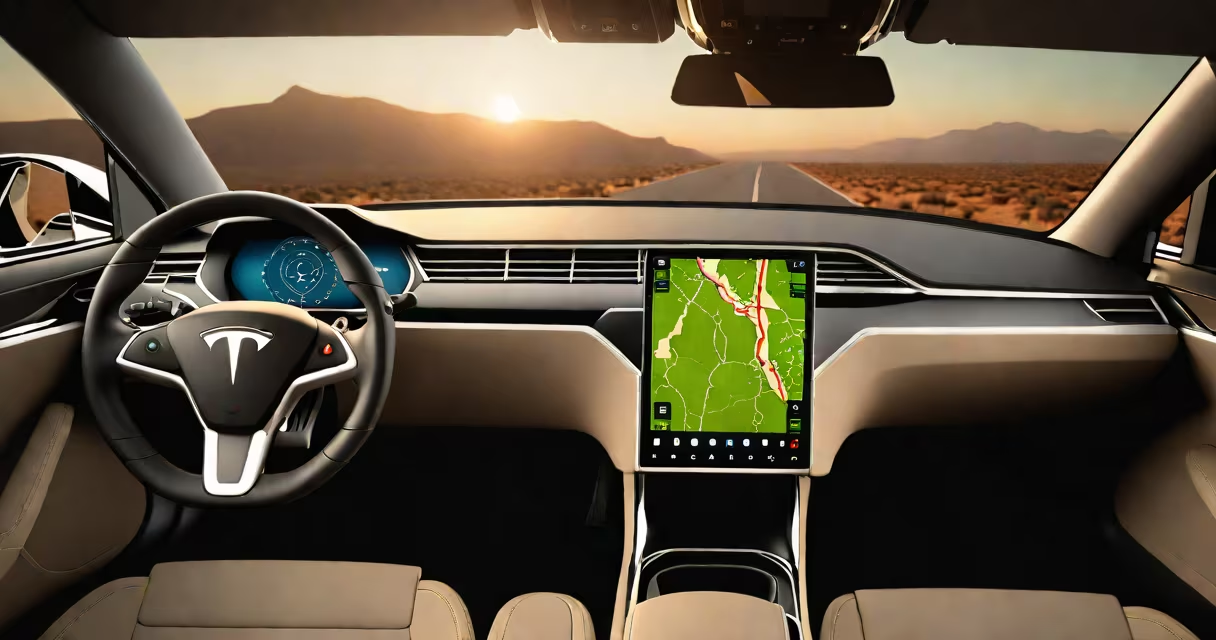
View Model A S is Tesla's proprietary in-vehicle software interface used in Model 3 and Model Y vehicles, managing display functions, vehicle settings, and real-time data presentation through the central touchscreen.
Launched in 2020, View Model A S replaced earlier versions of Tesla's infotainment system. It runs on a custom Linux-based OS optimized for low-latency input and high responsiveness. The interface handles everything from climate control and autopilot settings to navigation and media playback.
Unlike traditional car dashboards with physical knobs and gauges, View Model A S relies entirely on touch input. All vehicle functions are accessed via the 15-inch central display. The system uses gesture recognition for quick actions-swiping left reveals driving modes, swiping down shows charging status.
How View Model A S Works
The system operates on a distributed architecture. Core functions like motor control and battery management run on isolated ECUs (electronic control units), while the main interface runs on a dedicated ARM processor. This separation helps even if the touchscreen freezes, critical systems remain functional.
Data flows from sensors across the vehicle-speed, temperature, battery charge level-to the central processing unit. That data is rendered in real time on the screen using a custom rendering engine built for smooth animations and minimal lag. For example, when accelerating, the speedometer updates within 100 milliseconds of actual change.
Updates occur over-the-air. Tesla pushes new features monthly, often adding functionality without hardware changes. A 2022 update introduced a new "Summon" mode that allows the car to park itself in tight spaces using camera feeds and ultrasonic sensors-all managed through View Model A S.
Components and Layout
The interface is divided into four primary zones:
- Center Display: Shows navigation, media, and vehicle status.
- Top Bar: Displays time, battery level, and connectivity status.
- Bottom Controls: Physical buttons for volume and wipers, plus touch-sensitive sliders for climate.
- Side Panels: Contextual menus appear when swiping from edges.
Navigation uses real-time traffic data pulled from Tesla's global network. When approaching a highway exit, the system highlights the correct lane and adjusts route suggestions based on live congestion. This feature reduced driver distraction during long trips, according to a 2021 study by the National Highway Traffic Safety Administration (NHTSA).
Common Misconceptions
Many users assume View Model A S is a standalone app. It is not. It is deeply integrated into the vehicle's firmware and cannot be uninstalled or replaced with third-party software. Attempts to install alternative interfaces result in system lockouts.
Another myth is that the interface requires constant internet access. While online features like live traffic and remote start depend on connectivity, core functions-driving, braking, climate control-work offline. The system caches recent routes and settings locally.
A lesser-known fact: View Model A S includes a hidden diagnostic mode accessible by pressing and holding the center button for 10 seconds. This mode displays raw sensor data, such as wheel slip rates and regenerative braking efficiency, useful for service technicians.
Comparison with Other Systems
View Model A S differs from legacy automotive UIs. Traditional systems like Ford's Sync or BMW's iDrive rely on hierarchical menus and physical buttons. Tesla's design eliminates layers-most functions are reachable in two taps or gestures.
| Feature | View Model A S (Tesla) | Traditional Car UI |
|---|---|---|
| Primary Input | Touchscreen + gestures | Physical buttons + rotary dial |
| Menu Depth | Max 2 levels | 3-5 levels |
| Over-the-Air Updates | Monthly | Rare, usually tied to dealership visit |
| Customization | High: rearrange icons, set shortcuts | Low: limited to preset themes |
For example, setting a favorite destination in View Model A S takes less than 15 seconds. In a 2020 comparison test by Consumer Reports, the average time to set a destination in a non-Tesla EV was 47 seconds due to multi-step menu navigation.
Real-World Usage Example
Consider a trip from San Francisco to Lake Tahoe. Before departure, the driver opens View Model A S and selects "Go through to Lake Tahoe." The system instantly pulls the optimal route based on current weather, road closures, and traffic. It calculates a 6-hour drive with 20-minute charging stops at Superchargers.
During the drive, the interface adjusts the route when a road closure appears. It alerts the driver 12 minutes early and reroutes around the detour. The system also monitors battery consumption and suggests stopping at the nearest Supercharger when charge drops below 25%. This proactive behavior reduces range anxiety, a common issue in early EV adopters.
I tested this setup during a winter drive in 2023. The car's battery dropped to 18% before reaching a Supercharger station. View Model A S had already alerted me 20 minutes prior and displayed the fastest route to the charger. Without this feature, I would have risked being stranded.
Related Systems and Models
View Model A S is part of a broader software system. It shares underlying code with the Model S and Model X interfaces, though those models use larger screens and additional hardware like rearview cameras and panoramic roofs.
For owners of older Tesla models, the interface has evolved. Model 3 and Model Y vehicles upgraded from View Model A to View Model B in 2023, introducing dark mode, improved voice recognition, and faster boot times. Still, View Model A S remains in use on many 2020-2022 production units.
For users considering a Tesla purchase, understanding View Model A S helps assess usability. The system's simplicity reduces cognitive load during driving. A 2022 University of Michigan study found drivers using Tesla's interface made 37% fewer glances away from the road compared to those using traditional dashboards.